Talent users can only share with users who are in the same group inside of the same system as them. You will not be able to share from one account to another, unless your accounts are part of a shared Network whose systems are included to share as a Networked PLC.
How To Share with Your Other Account in the Same Network
If your other account is in a separate system that is part of a shared Network, you will be able to share with it by using the 'Share with My PLC' option in your Share pop-up!
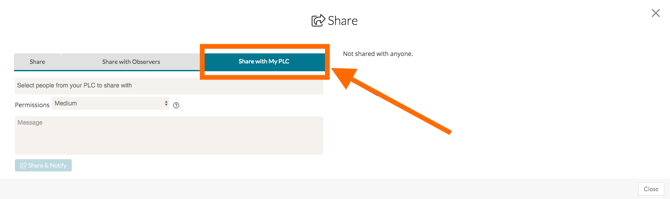
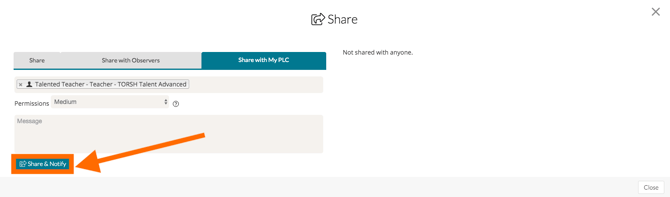
Choose the people from your PLC that you'd like to share with and confirm the Sharing Permission. Finally, click the blue 'Share & Notify' button to share your video/file.
How To Download Your Videos & Files To Upload To Your Other Account
If you are not part of a Networked PLC, you will not be able to share your videos & files with your account in another system directly through the platform. However, you can download the videos you would like to transfer from one account and re-upload them to your other account. Or, if you still have the videos on your device, you can upload them directly to your desired account.
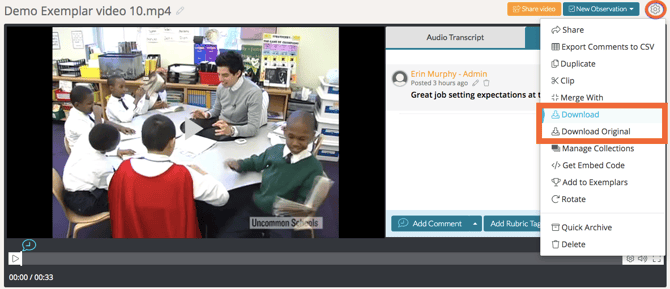
First, go to your 'Videos & Files' page in the top navigation bar. Then, simply open the video or file you would like to download and navigate to the 'gear icon' in the top, right-hand corner of the webpage.
In the dropdown menu, select 'Download Original' or 'Download.'
Clicking 'Download' saves the compressed version that appears on our platform, while clicking 'Download Original' saves the full resolution version that was originally uploaded.