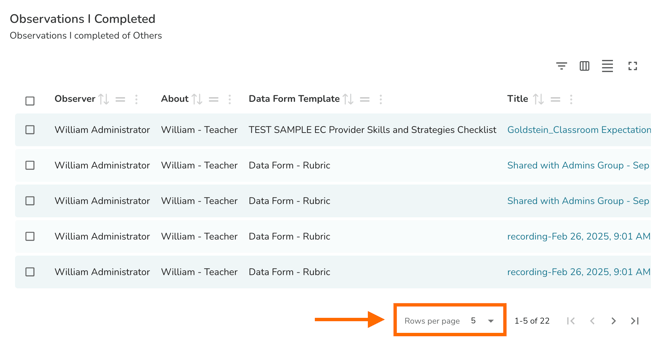
In TORSH Talent, you can bulk export completed Observations and Self Assessments to PDFs!
-
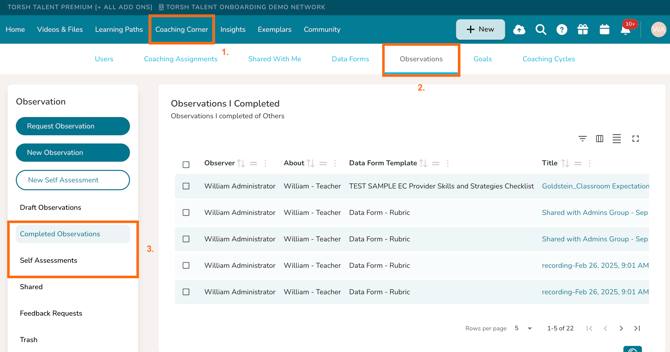
To do so, first navigate to 'Coaching Corner' and click the 'Observations' tab.
-
Select 'Completed Observations' in the left-side panel, if you wish to bulk export completed observations.
-
elect 'Self Assessments' if you wish to bulk export completed self assessments.
NOTE: If you are an Admin (or a Coach with specific system setting privileges) you will also find other users' completed observations/self assessments here.
-
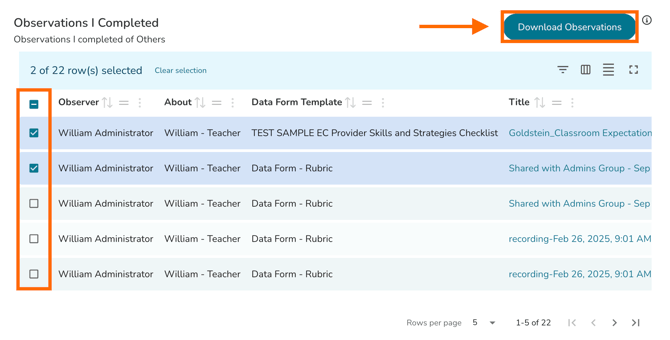
- Next, select the specific observation forms you wish to include in your export using the checkboxes provided to the left-hand side of each form listing. After you have made your selection, you should see a 'Download Observations' button appear in the top, right-hand corner of the table.
- Lastly, click on the 'Download Observations' button. This will generate a ZIP file containing PDFs of all observations/self assessments completed that you selected. Please be sure to remain on this webpage until the ZIP file is fully generated and downloaded. Once the ZIP file generates, it will download directly to your device.
NOTE: To include more observation/self assessment forms in your downloaded ZIP folder, please adjust the pagination at the bottom of the specific table you are downloading from via the 'Rows per page' option.