
As a System Admin, you can easily bulk invite multiple new users to your TORSH Talent system, setting their Role type, their user Group placement, and their license Term End Date in the process. To do so, Admins can upload a CSV file to create new user accounts in bulk!
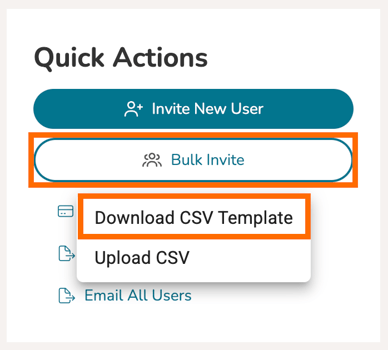
First, go to your Users Management panel. Once on the Users page, click 'Bulk Invite.' In the dropdown, select 'Download CSV Template.'
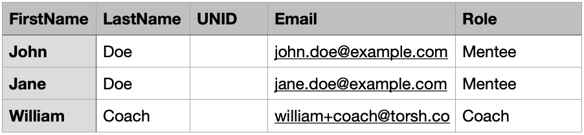
Once you open up the downloaded CSV file in your spreadsheet program of choice, you can begin filling out the template by following the example provided. You will insert each user's First Name, Last Name, Email Address, and Role. Though not required, you can also insert each user's Group(s) placement. Just be sure to separate each Group placement with commas, if they are being assigned to multiple groups. You do not need to worry about deleting the sample row.
NOTE: New users without a specified group, will be added to the Default Group. (Unless the user listed is an already existing user; in which case, they will remain in their previously designated groups).
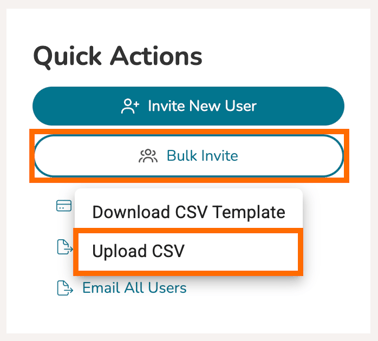
Once you have inserted all of the users, save the CSV file to your desktop. Make sure you export your saved changes as a CSV file. Then, return to your Talent webpage, click on 'Bulk Invite' once more and select 'Upload CSV' and select the CSV file you just created.
Talent will only accept the CSV file if it is without any errors. If there was an error in your upload, Talent will notify you.
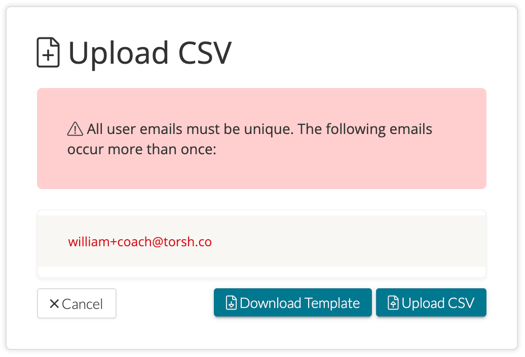
Potential errors include:
- Email address must be a valid email address.
- There cannot be more than one of the same email on the CSV.
- The Role must already exist in the system.
- Your system must have enough licenses left to assign to the number of users listed on the CSV.
Once the spreadsheet is formatted and uploaded correctly, the new user invites will be sent!
If you are trying to manage and modify existing users with a CSV upload, click here.