
In TORSH Talent, you can embed a video that is required for viewing within your Learning Path Module using the Embed Video component. This component is ideal for modules wherein supplementary training is provided through the video, and quiz questions need to be accessed after viewing the video. If you do not mark the component as required, it can still be a useful tool for embedding a singular video to be accessed within the module!
Adding the Embed Video Component
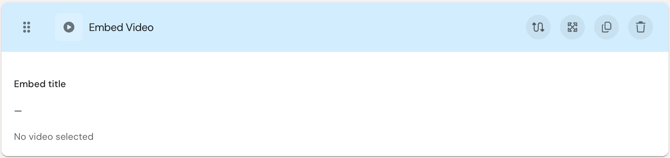
The Embed Video component allows users to watch an embedded video that is required for viewing in order to progress through the module. This is especially useful in situations wherein supplementary training is provided through the video, and quiz questions need to be accessed after the fact.
Preview:
Settings:
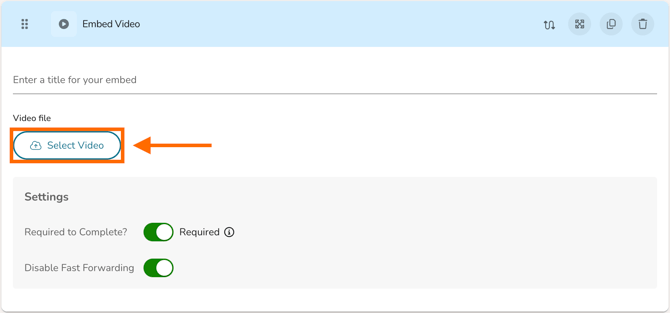
At the top of these settings, add a prompt to guide the participant or provide a title to the video. You can then click 'Select Video' to embed a video that you have uploaded as an artifact.
- If you would like for the embedded video to be required viewing in order to progress past this page, toggle the 'Required to Complete?' button ON.
- If you would like to restrict a learner's ability to fast forward through the video, toggle the 'Disable Fast Forwarding' button ON.
Adding Quiz Components To Be Completed Afterwards
If you would like for quiz items to only be accessible after watching the embedded video, you will then need to create a new page in your Learning Path Module after the page that your Embed Video component is housed. The next page after your Embed Video component page then needs to be marked as 'Required.'
To mark your quiz page as 'Required,' look to the top, right-hand corner of the module page and click the 'Page Settings' button. In the dropdown that appears, toggle the 'Page Required' button to ON.
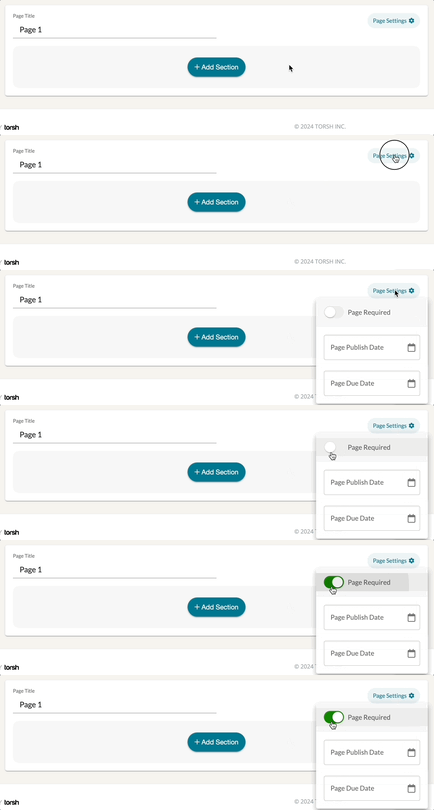
Now when your learners access the module, they will first need to complete the page with the Embed Video component before being allowed to access the subsequent page that houses your quiz questions.
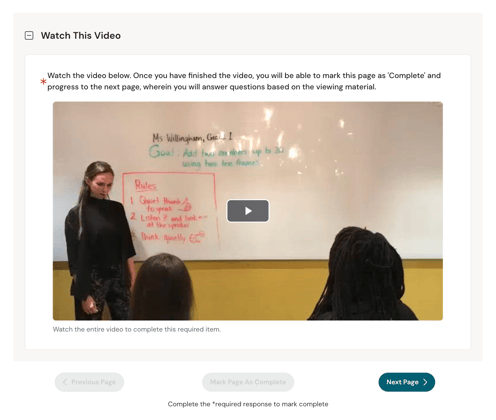
Participant Mode Behavior for Embed Video
When all settings of the Embed Video component are marked 'Required,' watching the video will save the learner's progress in the video timeline as they watch it. If a learner happens to refresh their webpage or leave the module while the video plays, they will not lose their place unless there was a temporary disruption in their internet connection. A learner can rewind the video from their place in the video timeline, but they cannot progress past the point they have viewed up to. Once the video has fully completed, their module page will be allowed to be 'Marked as Complete.'
When all settings of the Embed Video component are NOT marked 'Required,' watching the video will still save the learner's progress in the video timeline as they watch it. If a learner happens to refresh their webpage or leave the module while the video plays, they will not lose their place unless there was a temporary disruption in their internet connection. A learner can rewind or fast forward the video to any point in the video timeline. The video will not be required to watch completely in order to mark the module page a 'Mark as Complete.'