
If you wish to reset a Learner's progress in Learning Paths, you can do so for either a specific Module or an entire Course and its included modules. Read more below!
Contents:
I. How To Reset a Learner's Progress in a Module
II. How To Reset a Learner's Progress in a Course
How To Reset a Learner's Progress in a Module
If you only wish to reset a learner's progress within a specific Module, you can easily do so by following the steps below:
NOTE: If the Module in question is part of a larger course, resetting a learner's progress within a specific Module will not reset their progress within the other modules of the associated Course. It will only reset the progress of the specific module.
-
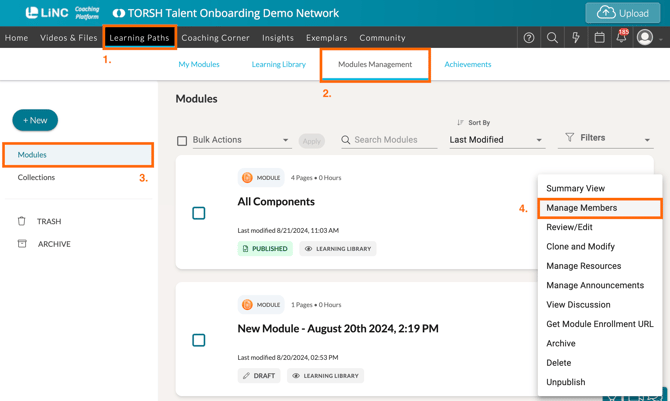
First, navigate to 'Learning Paths' in the top navigation bar of your TORSH Talent webpage.
-
Next, open the 'Modules Management' tab to reach the authoring side of Learning Paths.
-
Then locate the specific module using the search filter options on the 'Modules' view.
-
Then click on the module's '...' icon and select 'Manage Members' in the dropdown that appears.
-
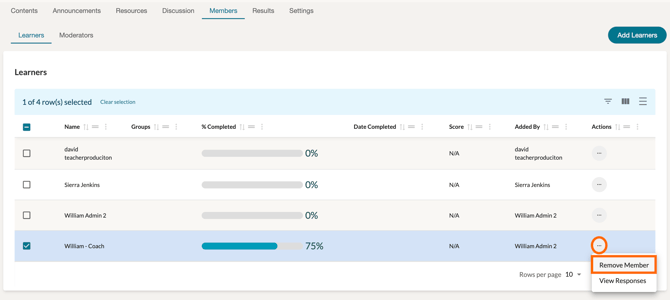
On the 'Members' tab of the module, make sure you are viewing the 'Learners' tab. Then search for the specific learner using the search filters provided.
-
Click on the '...' icon found to the far, right-hand side of the learner's listing and select 'Remove Member' from the dropdown.
-
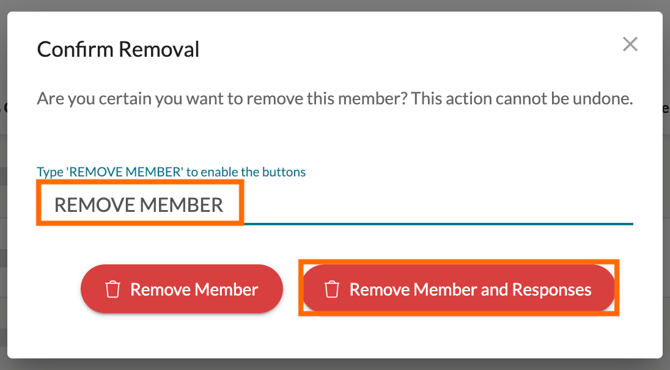
In the pop-up that appears, type-in 'REMOVE MEMBER' and then specifically select 'Remove Member and Responses.' This will un-enroll the learner from the module and delete their responses.
-
Next, click the 'Add Learners' button and select the user you just removed. This will re-enroll the learner back to the module with 0% completion.

How To Reset a Learner's Progress in a Course
If you wish to reset a learner's progress within a Course and its included modules, you will need to first remove the learner and their responses from the specific modules they have made progress in individually using the steps above - but refrain from adding them back into each module after removing them.
After you have removed them and their progress from each module started/completed, next un-enroll the learner from the entire course.
Lastly, re-enroll them to the course, and they will be able to start the course over from the beginning.